
How to make an OC intro video that feels like a cutscene
Give your original character an entrance: a title card, a first line and a look that fits who they are.
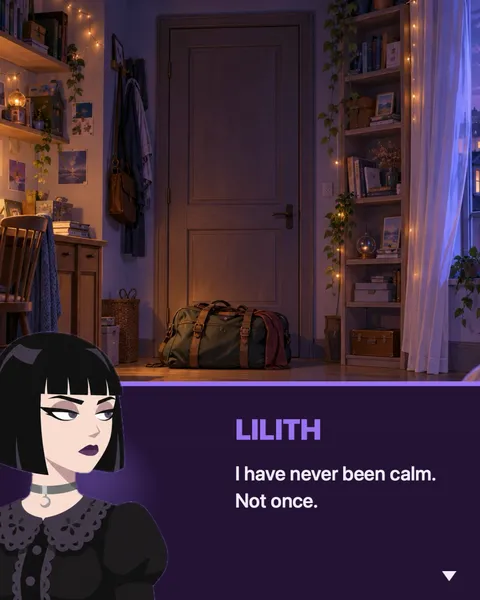
You drew them, named them and gave them a past. Now they need an entrance.
An original character, or OC, is one you created yourself instead of adapting from an existing story. In a game, a cutscene is the short scene that stops play to show characters talking, set the mood and make you care. That’s the feeling to aim for. Your OC walks on, says something, and the story starts.
Here’s how to write that scene, five ways to open it, and how to stage it as a video in DialogCut.
What makes an intro feel like a cutscene
A good intro is small: one place, one or two characters, a handful of lines. Five parts do most of the work.
The name gets its own moment. Put it on a title card before anyone speaks. The small label above the title sets the tone: “Character file”, “Chapter zero”, “Now entering”.
The place sets the mood. A rooftop at sunset says one thing. A dark bedroom with a packed bag by the door says another. Let the place show on its own before anyone talks.
The first line shows what they want. Skip age, height and star sign. One line about what your OC is after tells us more than a list.
Someone reacts. A second character’s reply shows how the world sees your OC. Awe, fear and an eye roll are three different introductions.
It ends on a hook. The last line leaves a question hanging. Why are they back? What’s in the box?
A script you can copy
Here’s a complete intro for Nyx, a courier who only works nights. Keep the shape and swap in your own character.
Title card · Label: Character file · Title: Nyx Calloway · Subtitle: Courier. Night shift only.
Background · A rainy street at night
Narration · Every city has one door that only opens after midnight.
Nyx · Package for apartment zero. Sign here. Don’t ask what’s inside.
Bram · There is no apartment zero.
Nyx · There is tonight.
The narration is the story’s own voice, words no one on stage speaks. Nyx gets the first word and the last. Bram is there to be confused, which is his whole job.
Five OC introduction ideas
The arrival
Someone else announces your OC before we see them. Narration works, and so does a nervous friend.
Narration · The bell rang. Nobody had rung it since the war.
The rival
Your OC introduces themselves by sizing up the hero. One line, and everyone knows where they stand.
Your OC · You’re the one they sent? I expected someone taller.
The case file
Write it like a report: “Subject” as the title card’s label, narration in a flat, official voice, then one line from your OC that breaks the tone. This is where Deadline shines.
The debut
An idol OC needs a stage and a partner. Let the partner hype them up while your OC stays cool, or the other way round. Glitter was made for this.
The unreliable narrator
The narration says one thing. Your OC says the opposite.
Narration · She was the calmest person in the room.
Your OC · I have never been calm. Not once.
Pick a look that fits who they are
DialogCut stages the same script in eight themes, and you switch between them in one tap. Three suit OC intros best. See all eight themes.
Novel is the visual novel. The speaker steps forward, the name lands in their color, and the line arrives in a soft box. The other character stays on stage a step back, so every reply reads as a conversation. New to the format? Read what a visual novel is.
Glitter puts both characters side by side on tinted glass, with words in white outline and sparkles in the air. It’s for idol OCs and anyone who should arrive like a star.
Deadline stands the speaker beside the words, with the name big and bold in their color, and turns title cards into posters. It reads like a profile or an interview, which makes it the home of the case file.
Whichever you pick, choose your OC’s Signature Color with care. It’s the color their name wears on stage, so treat it as part of the outfit.
Make it in DialogCut
- Make your OC. On the Characters tab, tap New and type a name. Tap the portrait button, choose Photo Library and pick your drawing. DialogCut removes the background. Art that’s already cut out is used as it is.
- Frame them. In Move and scale, drag and pinch until the head and shoulders sit right. Check Face orientation so your OC looks the right way, then tap Choose. Pick a Signature Color.
- Start a story. On the Stories tab, tap New story. In Choose Characters, pick your OC and whoever reacts.
- Write the intro. Tap Add › Title Card for the name, then Add › Background for the place: your own picture from Open Gallery, or a painted place from Sample Backgrounds. The card opens the video, and the place appears as it lifts. Tap Add › Narration for the narrator, and tap a character in the bar to give them a line.
- Give the place a moment. In Preview, tap the background change on the timeline, tap Hold, and choose how long the place shows on its own.
- Find the look. Tap Themes and try Novel, Glitter and Deadline. For a game feel, pick Typewriter in Text reveal. Set Pacing a little slower for a dramatic entrance.
- Export. In Format, keep 9:16 (Social) for TikTok, Reels and Shorts. Tap Export, then Start, and tap Save video when you see “It’s a wrap.”
Your OC stays on the Characters tab, ready for the next scene.
Your OC’s turn
Give them the entrance they deserve. Get DialogCut on the App Store or Google Play.
Sources
- “Original character,” Wikipedia: https://en.wikipedia.org/wiki/Original_character
- “Cutscene,” Wikipedia: https://en.wikipedia.org/wiki/Cutscene