
“Previously on…”: D&D recaps your table will actually watch
Turn last week's session into a one-minute recap with a narrator, the party and the places you played.
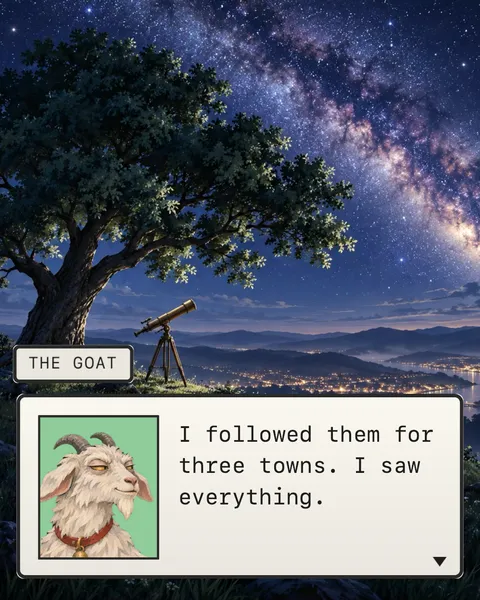
Every campaign night starts the same way. Someone asks where you left off, and three players remember three different sessions.
Recaps are part of running a game. The 2024 Dungeon Master’s Guide opens its advice on running a session with ways to recap earlier sessions of an ongoing campaign. A recap video does that job before anyone rolls a die, and it gives the whole table something to watch together while the snacks come out.
Here’s what a good recap does, a template to fill in, and how to make one with your party’s own art.
What a good recap does
It pulls everyone back in. Mike Shea of Sly Flourish puts a strong start second in his eight steps of session prep, and writes that “the strong start draws players out of the real world and into the game.” A recap can be that start, or lead straight into it.
It reminds the table who’s who. Faces and names on screen answer “wait, which one is the cleric?” before anyone asks.
It keeps what matters tonight. Shea also suggests reviewing last session’s secrets and bringing forward the ones still in play. Do the same with your recap: cut the shopping trip, keep the clue.
It ends where you stopped. The last thing on screen is the cliffhanger. Then the DM picks up from that exact moment.
A D&D session recap template
Seven parts, in this order:
- A title card. Label: the session number. Title: “Previously on…”. Subtitle: the campaign’s name.
- The place it started. A background change.
- The DM’s setup. One sentence of narration.
- A line from each character. Their best moment, in their own words.
- A new background for every new place.
- The twist. Narration again.
- The cliffhanger. The last line of the night, word for word.
Here it is, filled in:
Title card · Label: Session 7 · Title: Previously on… · Subtitle: The Salt Road
Background · A tavern at night
Narration · Four strangers took a job from a very nervous innkeeper.
Brother Aldo · Let the record show I voted no.
Background · A forest path
Kit · I did not wrestle the bear. The bear wrestled me.
Narration · Past the standing stone, they found the old chapel.
Vex · Nobody touch the glowing door.
Narration · Someone touched the glowing door.
Keep a notes page open during play and write down the lines that make the table laugh. That’s your next recap, already written.
Give every player at least one line, even the quiet ones. Hearing their own words back is half the fun, and nobody feels like an extra in their own campaign.
Keep it short. A recap is a trailer for tonight, not a replay of last week. If a moment won’t matter in the next session, it can live in your notes instead.
Recap ideas beyond the template
The bard’s version
One character tells the whole story and gets it wrong. Narration quietly corrects them after every line.
The villain’s report
The villain recaps the party’s progress to their boss, unimpressed. It doubles as a hint about what the villain knows.
The witness
An NPC who saw everything tells it from the side: the innkeeper, the ferryman, the goat that followed the party for three towns.
The players’ version
Skip the characters and recap as the people at the table: who failed the easiest roll of the night, who wanted to go home.
The tavern rumor
End the recap back at the inn, where a stranger mentions something the party hasn’t found yet. It’s a recap and a teaser in one, and it plants tonight’s hook before play starts.
Why Quest fits the table
Quest is DialogCut’s fantasy RPG theme: a retro RPG box with your character’s face inside, a name tab and a block cursor. Only one face shows at a time, so a party of five never crowds the screen. Narration is the DM’s voice: the face and the name step away, and the words arrive in italics. Each character’s Signature Color sits behind their face, so every player spots theirs.
Curious where that box comes from? Read a short history of the dialogue box, or see Quest beside the other seven themes.
Make it in DialogCut
- Build the party once. On the Characters tab, tap New for each character, tap the portrait button and choose Photo Library. Use the art your players already have, and ask them first. DialogCut removes the background. Give each character a Signature Color.
- Start the recap. On the Stories tab, tap New story and pick the party in Choose Characters.
- Write it. Tap Add › Title Card for the session, Add › Background for each place and Add › Narration for the DM. Tap a character in the bar to give them a line.
- Set the scene. In Choose Background, Sample Backgrounds has painted places like a tavern, a forest and a throne room. Or tap Open Gallery and use a photo of your own battle map.
- Pick Quest. In Preview, tap Themes, then Quest and a look such as Night or Slate. Pick Typewriter in Text reveal to type every line behind the block cursor.
- Choose the shape. In Format, pick 16:9 to play it at the start of the session or post it on YouTube, or 9:16 (Social) for TikTok, Reels and Shorts.
- Export and share. Tap Export, then Start. Tap Save video, or More to send it to any app.
- Next week. On the Stories tab, tap … on the recap and choose Duplicate. The party is already cast. Change the lines and go.
Roll for recap
Make it before anyone forgets what the bear did. Get DialogCut on the App Store or Google Play.
Sources
- “How the 2024 Dungeon Master’s Guide Makes It Easier to Be a First-Time DM,” D&D Beyond, October 7, 2024: https://www.dndbeyond.com/posts/1829-how-the-2024-dungeon-masters-guide-makes-it-easier
- Mike Shea, “The Eight Steps of the Lazy DM – 2023 Review,” Sly Flourish, October 23, 2023: https://slyflourish.com/eight_steps_2023.html