
Beyond the chat screen: turn a text story into a staged scene
Text stories made dialogue a video genre. Give yours faces, a place and a narrator: how to move a text story onto a stage.
Open any feed and you will find a phone inside the phone: a gray bubble, a blue bubble, three dots, a cliffhanger typed in lowercase. Text stories have been a video genre for years: TextingStory, an app that records a written conversation as a video, launched in February 2016.
Text stories proved something worth keeping: people will happily watch two characters talk. This post is about giving that talk a stage, with faces, a place and a narrator, and about moving a story you have already written onto one.
What text stories get right
Anyone can make one, because a text story needs nothing but words. And the suspense lives in the waiting: the dots that appear and vanish, the reply that does not come.
What a stage adds
Faces. Every line has a speaker you can see, and the listener is on stage too. You watch a line land on someone, and that is where so much of the drama lives.
A place. A ghost story in an old manor looks like an old manor. A heist on a starship looks like a starship. When the story moves, the place moves with it.
A narrator. Some words belong to nobody: “Midnight. Nobody in the house is asleep.” Narration gives them a voice of their own, so time can pass without a character announcing it.
A genre. One script can be eight different genres. Switch the theme and the same words become a visual novel, a JRPG cutscene, a comic, a film, a stage play, an idol stage, a documentary or a romance.
What a staged scene is
A staged scene performs a script one line at a time. The speaker is named, their portrait steps into the light, the listener cools a little, and the words arrive at reading pace in a box that belongs to the genre. Then the scene breathes before the next voice takes over.
Not every moment is a line. Narration is words no one speaks. A title card can jump three days or close an episode. A background change moves the scene from the café to the station. Lines, narration, title cards and background changes: that is the whole script, and it is enough for nearly any story.
None of it is new. It is the visual novel’s soft box with a name above it, the JRPG’s bordered window with a face tile inside, the comic panel that slams in, the film caption under a wide shot. (A short history of the dialogue box tells where it all came from.) What is new is having it in DialogCut, on your phone, with your own characters.
The same six lines, two ways
Here is a short exchange. Ravi is a flat vector drawing. Benny is a 3D render.
RAVI: You said the train leaves at nine.
BENNY: It does. From platform four.
RAVI: We’re on platform two, Benny.
BENNY: I carried your suitcase up forty steps.
Narration: Somewhere below them, a whistle.
BENNY: The train leaves from the other platform.
As a chat thread, the narration has nowhere to live; you would need a message nobody sent. The joke depends on the reader imagining the stairs, the suitcase and Benny’s face.
On a stage, the place does half the work: a painted station at dusk, an empty bench. On Novel, Benny is lit and in front when he speaks. Ravi waits a size smaller and a shade darker, then steps into the light for “We’re on platform two, Benny.” The narration darkens the box and both figures dim, so the whistle lands as a moment instead of a line of text. When Benny delivers the last line, the pause before it is a real pause, timed for reading.
Narration works on every theme. On Mist there is no box at all: the place fills the screen and the narrator’s words arrive as a film caption, in italics.
How to move a text story onto a stage
Rewrite your story as a script, one line at a time.
- Cast it. On the Stories tab, tap New story, then New to make a character. Type a name, tap the portrait button, choose Photo Library and pick your drawing. When you see “Person found, background removed.”, tap Choose. No art yet? Start from Sample Portraits and swap them later with Recast.
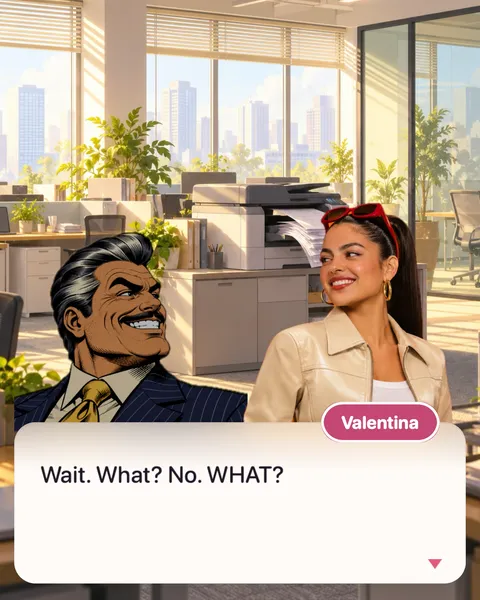
- Merge the bursts. Five quick texts (“wait”, “what”, “no”, “WHAT”) read better as one line, with the punctuation doing the rhythm: “Wait. What? No. WHAT?” Tap a character in the bar, type the line and tap ✓.
- Turn timestamps into narration and title cards. “11:47 PM” becomes narration with Add › Narration: “Midnight. Nobody in the house is asleep.” “3 hours later” becomes a title card with Add › Title Card.
- Give it a place. Tap Add › Background and pick a painted place from Sample Backgrounds, or your own photo or video with Open Gallery. Add another background change whenever the story moves.
- Choose the stage, then the pace. In Preview, tap Themes and match the theme to the genre: Novel for a slow burn, Mist for a mystery. Pick a Text reveal and set the Pacing. In Format, pick 9:16 (Social), then tap Export and Start.
Questions
Can I use my own characters? Yes. Use a drawing, a painting, a meme or art with a transparent background. DialogCut removes the background, and your characters face each other on stage.
Does it work for TikTok, Reels and Shorts? Yes. Export in 9:16 (Social) at 1080p. It keeps your words and the dialogue box clear of the buttons and captions on TikTok, Reels and Shorts.
Give your next story a stage
Write the lines, cast your characters and watch them perform. Get DialogCut on the App Store or Google Play.
Sources
- “TextingStory,” Know Your Meme: https://knowyourmeme.com/memes/sites/textingstory